How to Stop Doomscrolling — 8 Methods That Actually Work
You open Instagram to check one thing. Forty minutes later you're watching a stranger pressure-wash a driveway. You weren't even enjoying it. You put the phone down, pick it up again two minutes later, and somehow end up on TikTok.
Sound familiar? You're not alone — and you're not weak. You're fighting a system designed to keep you scrolling.
Why you can't just "stop"
Your brain doesn't get pleasure from scrolling. It gets anticipation. The next post might be funny, shocking, or useful — and that "might" is what keeps your thumb moving. It's the same mechanism as a slot machine: unpredictable rewards are more addictive than consistent ones.
On top of that, your brain has a negativity bias — bad news is roughly 3x more engaging than good news. Social media algorithms know this. They feed you content that triggers outrage, anxiety, and fear because that's what keeps you watching. Researchers call the result "popcorn brain" — a mind so used to constant stimulation that real life feels boring by comparison.
This is why willpower alone doesn't work. The apps are engineered by teams of hundreds to keep you scrolling — infinite scroll, autoplay, pull-to-refresh. You need to change your environment, not just try harder.
8 methods, ranked by effectiveness
1. Change your home screen
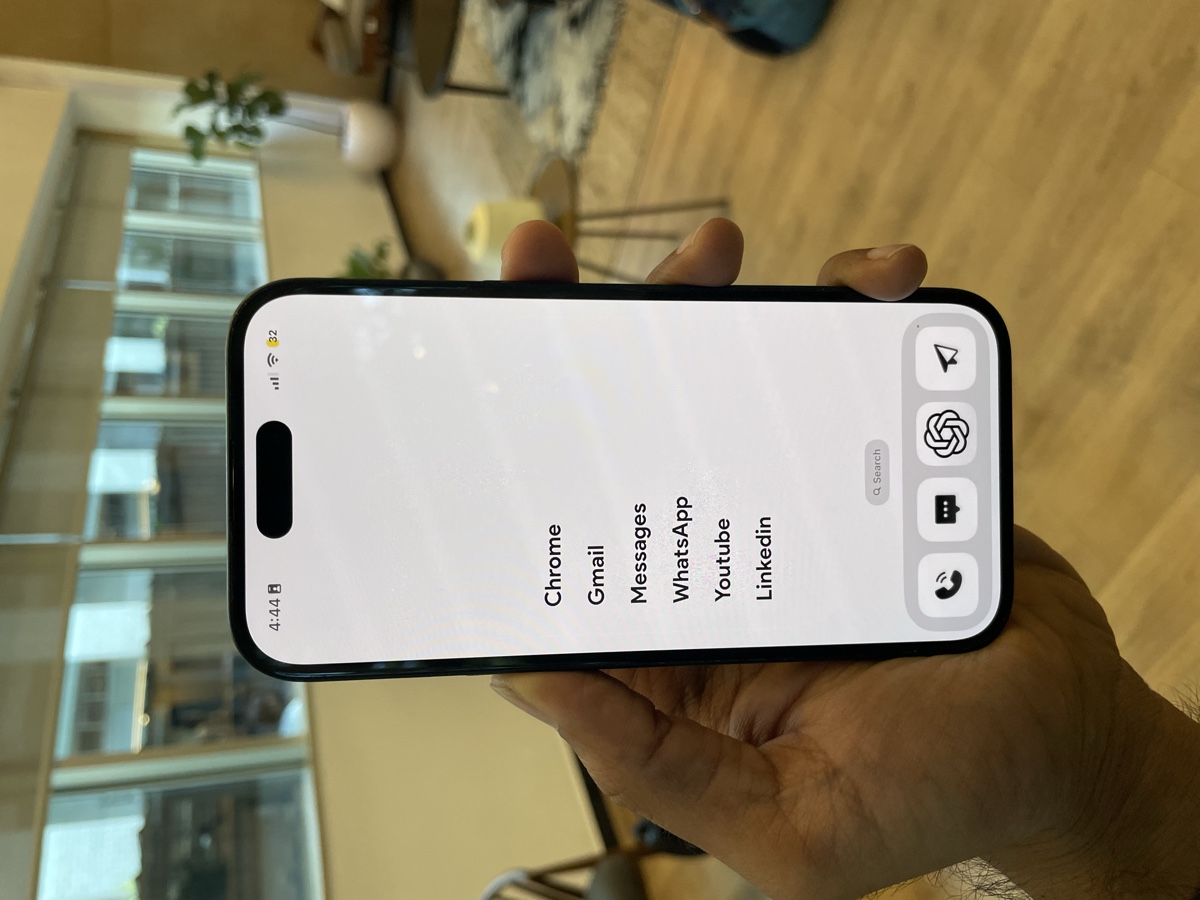
This is the single most effective thing you can do. Your home screen is where most mindless sessions begin — you see a colorful app icon, you tap it, and you're gone.
Replace your home screen with a text-based, minimal layout that only shows your essential apps. No icons, no temptation. Minimalist Launcher does this in under 2 minutes, and 230,000+ people have used it to cut their screen time by up to 75%.
When the trigger is gone, the habit breaks.
2. Block apps by usage, not by time
"30 minutes of Instagram per day" limits don't work — you hit the limit and immediately override it. Instead, block apps after a short session (e.g., 5 minutes per open). The friction of getting blocked, closing, and having to consciously reopen is far more effective than a single daily countdown.
Minimalist Launcher's Digital Detox feature does exactly this — you can set both schedule-based and usage-based blocking.
3. Get the phone out of your bedroom
The morning scroll and the bedtime scroll are the two worst sessions of your day. One sets an anxious tone; the other steals your sleep.
Buy a cheap alarm clock. Charge your phone in another room. This one change eliminates roughly 40% of most people's daily scroll time — the sessions that happen on autopilot while you're half-awake.
4. Force a re-login
Log out of Instagram, TikTok, Twitter, and Reddit after every session. Next time you open the app, you'll have to type your password. That 10 seconds of friction is usually enough to make you think: "Do I actually want to do this right now?"
Most of the time, the answer is no.
5. Ask "what am I looking for?"
Before you open any app, say out loud (or in your head) what you're specifically going to do and when you'll stop. "I'm going to check if Sarah replied to my message." That's it.
If you can't name a specific reason, put the phone down. This tiny habit separates intentional use from mindless scrolling.
6. Use ads as your exit cue
This one comes from a Reddit thread and it's surprisingly effective: every time you hit an ad while scrolling, close the app immediately. The ad becomes your built-in stop signal.
You'll be amazed how often ads appear — and how little you actually miss.
7. Nuke your feed
Unfollow everyone and everything that doesn't genuinely add value. Yes, all of it. Mute, unfollow, block. Let the algorithm reset.
A boring feed is an easy feed to leave. You're not missing anything — you're just removing the content that was engineered to keep you hooked.
8. Replace, don't just remove
If you just delete apps and white-knuckle it, you'll be back within a week. Boredom needs somewhere to go.
Put a book where you usually scroll on the couch. Keep a puzzle game or a language app on your home screen where Instagram used to be. The goal isn't to eliminate downtime — it's to fill it with something that doesn't leave you feeling worse.
A simple 7-day plan
If you want to try this, here's a lightweight plan:
Days 1–2: Audit and remove. Check your screen time. Note your worst apps and worst times of day. Move social apps off your home screen (or install Minimalist Launcher).
Days 3–5: Add friction. Log out of social apps. Phone out of bedroom. Start using the "what am I looking for?" rule before each unlock.
Days 6–7: Review and adjust. Check your screen time again. Compare it to Day 1. Keep what's working, drop what isn't.
You'll slip — and that's fine
The goal isn't zero scrolling. It's intentional scrolling. Some days you'll catch yourself 20 minutes deep in a rabbit hole. That's normal. What matters is that it stops being your default state.
The most important thing is to make the first change today — not tomorrow, not Monday. Change your home screen, log out of one app, or move your phone out of your bedroom tonight.
Small friction, big results.